
The Problem
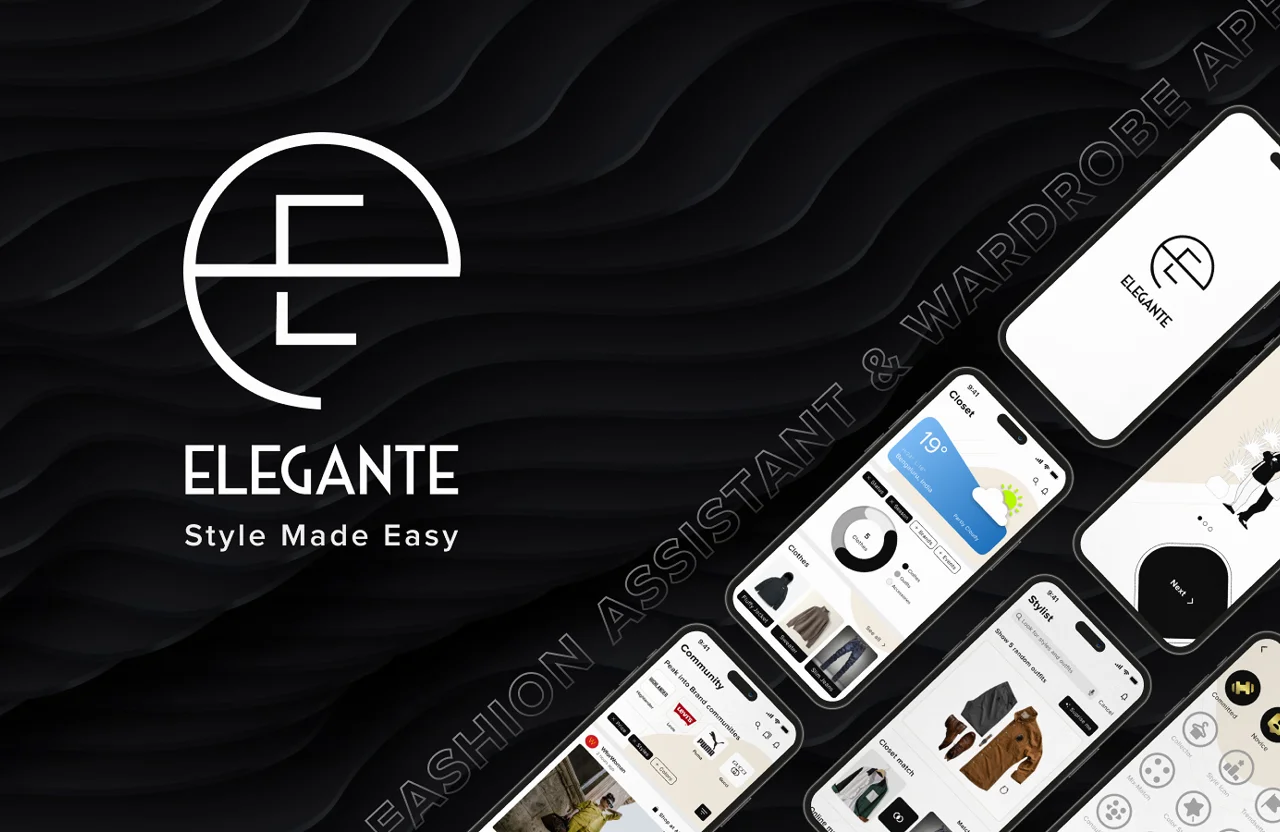
Getting dressed should be a small pleasure, not a daily standoff with the closet. The people around me kept hitting the same wall before any event: a wardrobe full of clothes and still nothing to wear. They scrolled Pinterest, flipped through magazines, and saved looks they could never quite recreate with what they actually owned. Inspiration was everywhere, but none of it knew what was already in the wardrobe. Elegante starts from that gap. A personal fashion friend that works from your real clothes, it organises your wardrobe, helps you assemble outfits with confidence, and lets you share your creations with friends and the wider Elegante community. The promise on the cover says it plainly: style made easy. This was an independent project completed during the ITLH Design Course, owned end to end: user research, branding, sketches, , and . The work spanned six weeks and 35+ screens.Research and Wireframes
Research with 42 participants combined a broad survey group with a smaller set of in-depth conversations, aimed at how people actually decide what to wear and where that decision breaks down. The themes were consistent: people felt uninspired despite owning plenty, they wanted suggestions tuned to the occasion and the weather, and they wanted to reuse and remix outfits they already liked rather than start from zero each morning. Each core screen was sketched on paper to find the structure quickly, then those flows were tested with several people before committing to pixels. Testing early surfaced language and flow problems while they were still cheap to fix, and shaped the navigation into five clear sections: Community, Stylist, Add, Closet, and Profile.The Solution
The answer became 5 core sections across 35+ screens. A closet that knows the day. The Closet is your wardrobe, digitised. It opens with the local weather and a quick breakdown of what you own by category, so the suggestions that follow fit both the forecast and the contents of your shelves. A Stylist, not a planner. The Stylist generates outfit ideas from your own clothes and offers a Closet Match flow where you set the criteria that matter: shades, season wear, the weather range, category, and occasion. The app then assembles looks that fit, turning a blank-stare morning into a short, confident choice. Community for the part that is social. Fashion is rarely a solo act, so Elegante lets people follow brand communities, share their own looks, and draw inspiration from others, keeping the spark of Pinterest while grounding it in clothes people actually wear.Testing and Iteration
during the phase, drawing on the same 42-participant pool as the research, changed real decisions. Participants found the label "Outfit Planner" misleading, so it became "Stylist," which matched how people thought about the feature. They also wanted to adjust suggestions on the fly, which led to a so the Stylist could be updated to fit the need of the moment rather than a fixed setup.The Brand
Elegante's identity was designed alongside the product. The builds on a bold, stylised letter "e" that doubles as a clean , paired with the line "Style Made Easy." The system stays monochrome and confident, elegant enough to feel like a styling companion while staying out of the clothes' way.Next Steps
The 6-week scope drew the line here. If the project continued, the clearest moves would be to expand the preference and collection categories, add a way to download or save the outfits a user creates or likes, and build a body-type-based avatar so people could preview how a look sits on them before stepping out. Elegante set out to take the stress out of getting dressed, and each of those steps pushes it further toward style made genuinely easy.Process
Lessons
- Test the words, not just the screens The biggest fix in the project was a label. "Outfit Planner" read as a chore. "Stylist" matched how people actually thought about the feature. Low-fidelity testing caught it before a single high-fidelity screen was built.
- Paper before pixels pays for itself Sketching every core screen and testing the flows on paper surfaced language and navigation problems while they were still cheap to fix. The five-section structure that survived to the final app was settled before was opened.
- Inspiration without inventory is noise The research kept repeating one thing: people had endless inspiration and no way to connect it to clothes they owned. Anchoring every suggestion to the user's real wardrobe was the single decision the whole product hangs on.
- Context does the styling Weather and occasion drove more outfit decisions than taste did. Opening the Closet with the local forecast made the suggestions feel personal without asking anything extra of the user.
FAQ
Those tools solve inspiration, not decision. The research showed people saved looks they could never recreate because nothing in the feed knew what they owned. Elegante starts from the user's actual wardrobe, so every suggestion is wearable right now.
Directly. The Stylist name, the segmented control for updating suggestions on the fly, the weather-led Closet, and the occasion-based matching all trace back to specific findings from the 42 participants. The navigation itself came out of testing paper flows before any pixels.
Community, Stylist, Add, Closet, and Profile each map to one job the research surfaced: get inspired by real people, get an outfit decision made, get clothes into the system, see what you own, and manage your preferences. Anything that did not serve one of those jobs was cut.
The Closet Match criteria. Shades, season, weather range, category, and occasion had to feel like a quick refinement rather than a form. It took several iterations for the flow to read as styling rather than data entry.
Richer preference and collection categories, a way to save or download outfits, and a body-type-based avatar so people can preview how a look sits on them before stepping out.