
Bengaluru, India
The Problem
Finding the Shape of the Problem
Personas and the BANT Matrix
One Flow, Three Roles
The Buyer's Side: Asking Well
A Form That Speaks Both Languages
Reading the Responses
The Seller's Side: Answering Well
Requests as a Pipeline
The Proposal Workspace
From Approval to Order
Three Cycles of Tightening
What the Numbers Said
Platform Evolution
Lessons
FAQ
Try it live
Work
/Case study: Ofofo RFP
CybersecurityUX ResearchDashboardsUser JourneysB2B

Ofofo RFP: When the Catalogue Runs Out

Mohammed Zabeeh·July 8, 2026·16 min read
Ofofo RFP: When the Catalogue Runs Out

A cybersecurity marketplace catalogue answers known needs. This is the system for everything else: custom requests for cybersecurity products and services travelling between a buyer dashboard, a seller dashboard and an admin, from a blank form to a purchased order.

20-25 / month
RFPs raised
$5,000
Average deal size
71%
Trial-run task success
16
BANT segments mapped
Client
Ofofo
Role
UX Lead
Timeline
2023 to 2024

The Problem

The Ofofo marketplace worked when a buyer knew what they wanted: browse, filter, compare, buy. But the buyers worth the most were arriving without a product name in mind. They had been told by a customer, an investor or a regulator that they needed "security sorted", they had money set aside and a deadline attached, and the one thing they did not have was the vocabulary to turn that pressure into a marketplace search. A catalogue cannot serve someone who cannot name what they need. Before this system, those buyers had exactly one route: email or call the Ofofo sales team and describe the requirement in prose. The team would ring around a few sellers, relay questions and answers in both directions, and after weeks of back and forth a deal might be confirmed, or, often enough, one side would simply back out. Every one of those deals lived in inboxes the platform could not see, learn from or speed up. The custom request-for-proposal system, RFP for short, became the answer: let the buyer describe the problem in their own words, let qualified sellers respond with structured proposals, and let the platform carry the whole negotiation from blank form to purchased order.

Finding the Shape of the Problem

Personas and the BANT Matrix

The groundwork came from two research artefacts. The persona work gave us the human texture: Emily, the marketing manager whose company just got breached and who needs recovery she can understand; Raj, the entrepreneur buying security to close enterprise deals; Daniel, the researcher gathering intelligence with no immediate purchase intent. Three very different reasons to arrive, and only one of them maps cleanly onto a catalogue. A buyer persona board for the compromised client, with background, needs and behavioural insight sticky notes The sharper instrument was a BANT segmentation: all sixteen combinations of Budget, Authority, Need and Timing, each mapped to the features that would actually serve that visitor. It sounds like a sales exercise, and it started as one, but one row changed the product. The Interested Decision-Maker, the visitor with budget, authority and timing but no articulated need, was prescribed exactly one distinctive feature: request-for-proposal templates. The most commercially valuable person on the site was the one the catalogue could not help, and the RFP flow existed for them. The BANT research board with two draft matrices crossing sixteen persona segments against budget, authority, need and timing, with feature sticky notes per segment

One Flow, Three Roles

Before any screens, the flow was drawn end to end in FigJam and mapped in the information architecture as four side-by-side columns: the process itself, the buyer dashboard, the seller dashboard and the admin side. A request is created by a buyer, discovered by sellers, answered with proposals, decided by the buyer, supervised by the admin, and settled through checkout into an order. Every screen in both dashboards had to earn its place in that journey. The full RFP task flow diagram spanning buyer, seller and admin lanes with decision diamonds, status ladders and the checkout handoff The information architecture board mapping the custom RFP process across the buyer dashboard, seller dashboard and admin side in four columns The flow also fixed the governance rules that make a negotiation fair. A buyer can edit their request only until the first proposal arrives, because sellers should never respond to a moving target. A seller can edit their proposal only until the buyer shortlists it, for the same reason in reverse. A seller can nudge an approved-but-unpaid buyer exactly once. And anything nonstandard, like custom form fields, routes through the admin rather than growing wild.

The Buyer's Side: Asking Well

A Form That Speaks Both Languages

The request form is where a vague obligation becomes a specification, so it does the translating. The buyer names the product or service they think they need, describes the requirement in their own words, sets a maximum budget in dollars, and picks a pricing model, with an escape hatch ("Add Custom Pricing Model") for anything the presets miss. Features and deliverables are added as tags rather than prose, which quietly produces the structured data sellers need to respond precisely. Two dates, a closing date for proposals and an estimated start, give the request a clock. The Create Custom Request For Proposal modal filled in with feature and deliverable tags, budget, pricing model and dates The empty state does the recruiting ("No RFPs created. Start creating!"), and a persistent "Get a Custom Quote" button sits at the top of the sidebar on every dashboard page, because the moment a buyer realises the catalogue does not have their answer can happen anywhere. In practice it mostly happened in the marketplace itself: six of every ten RFPs were born on the zero-results page, where a failed search offers "Get Custom Quotation" instead of a dead end.

Reading the Responses

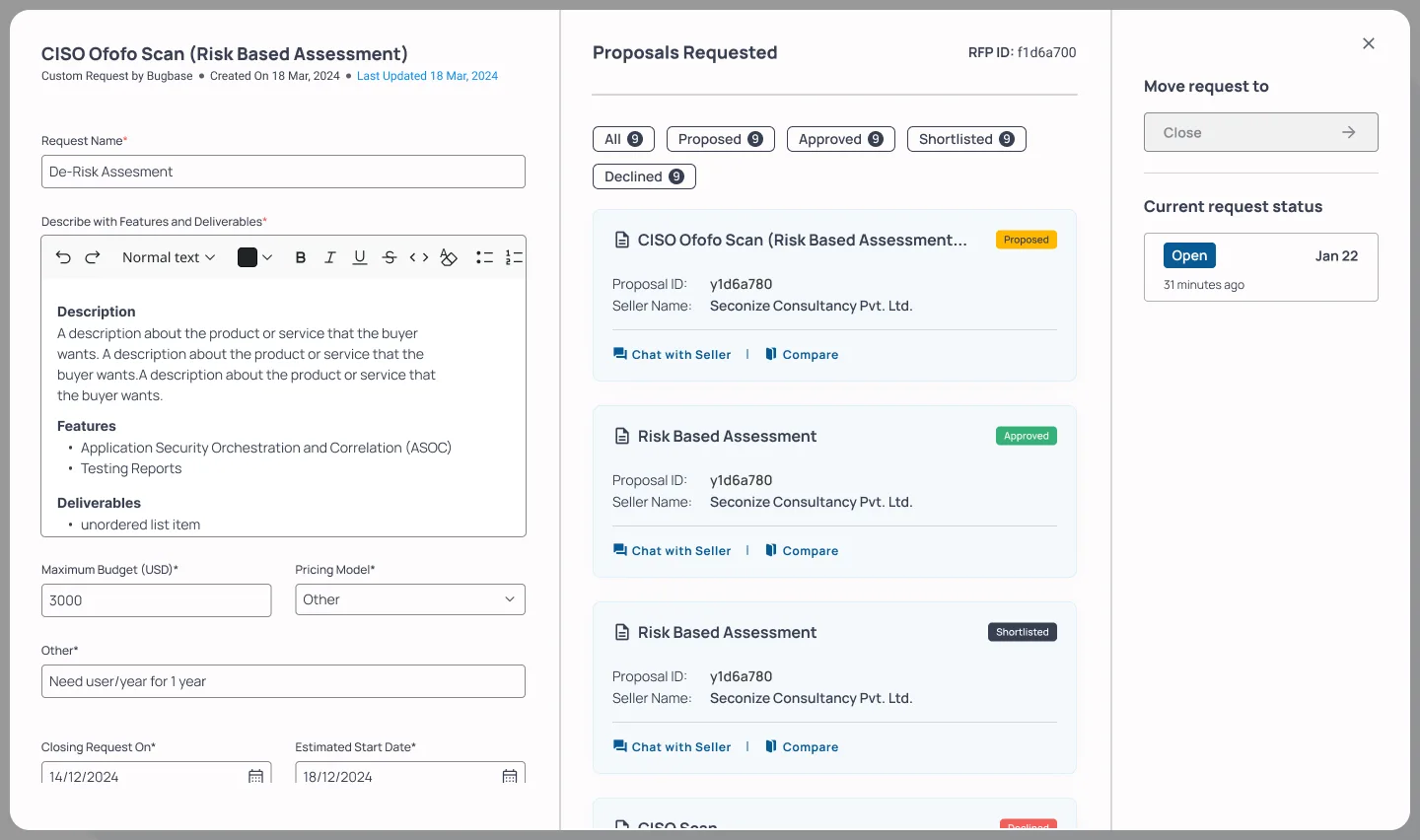
An open request becomes a three-pane workspace: the request on the left, incoming proposals in the middle filtered by status pills (All, Proposed, Shortlisted, Approved, Declined, each with counts and a plain-language tooltip), and the request's own controls on the right. Before anything arrives, the middle pane says "Be patient, proposals coming your way", which is a small kindness that stops a new feature feeling broken. The buyer's View RFP workspace with the request summary on the left, four seller proposal cards with status pills in the middle, and request controls on the right Each proposal opens into an itemised detail: services described line by line, deliverables listed, the seller's price sitting directly against the buyer's stated maximum. Decisions live in one place, a "Move proposal to" rail with Shortlist, Approve and Decline, each gated by a confirmation. And because the point of an RFP is choosing between answers, proposals can be compared side by side, attribute by attribute, with the status controls embedded in the comparison itself. The rules kept the ending honest: up to four proposals could be approved and compared against each other, but every request resolves into exactly one purchase, chosen by the buyer. A seller proposal opened in the buyer workspace, with itemised services and deliverables and the Shortlist, Approve and Decline rail The Compare Proposals modal showing two proposals side by side with pricing, services, deliverables and inline status controls Approval is not the end of the journey, it is the start of the transaction: the approved proposal grows a "Checkout Product" action, payment runs through the standard checkout, and the request closes with an order ID and a "View Order" link into the orders system the buyer already knows.

The Seller's Side: Answering Well

Requests as a Pipeline

For sellers, incoming custom requests are demand, so they surface as a first-class KPI on the dashboard home ("Custom Requests: 12, +10% than last week") alongside orders and offerings. The RFP section itself is a pipeline table: request name, buyer, open or closed status, dates, and three actions per row, chat with the buyer, view the request, draft a proposal, with drafting sensibly disabled on closed requests. The seller dashboard home with KPI cards for orders, open orders, custom requests and offerings, plus most viewed offerings The seller's Custom Requests Raised table with buyer names, open and closed status pills, filters and per-row actions Distribution itself turned out to be a design decision. The first version broadcast every request to every seller, and only about half of them ever responded. The fix came from structure the form already captured: the keywords and tags on each RFP were matched against the services each seller listed, so a request landed only with sellers who could actually cater to it. Response quality went up precisely because the audience got smaller, and sellers kept control of the volume: a preference let each seller receive only the RFPs matching their services, or notifications for everything.

The Proposal Workspace

Opening a request mirrors the buyer's three-pane layout: the buyer's requirement on the left, exactly as written, the proposal workspace in the middle, and the status rail on the right. The proposal form forks first on one question, "What are you offering?", because a product and a service need different anatomies. From there: name, category, pricing model with the same custom escape hatch the buyer has, price, and repeating cards for features, deliverables and services, plus a reference link "to a similar offering to help buyers better understand what you are creating" and PDF attachments. The seller's three-panel proposal workspace with the buyer's request on the left, the draft proposal form in the middle and the status rail on the right The status ladder is the same five words the buyer sees, defined from the seller's anxiety rather than the system's: Proposed means "the buyer hasn't taken any action on your proposal yet", Shortlisted, Approved and Declined say exactly who did what. Both sides of the negotiation read one shared vocabulary, which is most of what keeps a two-sided feature from feeling like two different features. The seller's request view with the five-status proposal legend expanded, from Requested through Declined

From Approval to Order

An approved proposal is money not yet in the bank, so the rail changes to Purchase Details: "Yet to be purchased!" with a single-use Remind Buyer action. Once the buyer pays, the same card flips to a purchased banner with the order date, order ID and a View Orders button, and the seller gets a "Create Offering" action that spawns a custom offering, with the RFP and proposal viewable alongside while building it. The custom offering then enters the same marketplace approval pipeline as everything else the seller lists. The RFP system does not bypass the marketplace's quality gate; it feeds it. The approved proposal showing the Purchased banner with order date, order ID and the View Orders button

Three Cycles of Tightening

The flow did not stop at its first version; it went through three cycles of changes, each funded by watching real behaviour. The buyer's create form collapsed three structured inputs into a single rich-text editor for description, features and deliverables, added PDF attachments, and renamed the action from a passive Save to an honest "Raise Request". Every status pill gained a tooltip, every proposal card gained a Compare link, and requests became editable with proper success and failure toasts. RFP status was promoted onto the dashboard home and into a notifications tray, because a negotiation you have to go looking for is a negotiation that stalls. The seller side got the bigger structural change: the chrome was rebuilt around a dual-role account, with a company switcher and a "Switch to Buying" toggle in the top bar. Sellers buy security too, and the platform stopped pretending otherwise. The Cycle 2 seller Custom Quote page with the rebuilt chrome, company switcher, Switch to Buying toggle and active filter chips Both journeys were then wired into click-through prototypes covering the full happy path, from landing page to approved proposal on the buyer side, and from the requests table through drafting, every status and the purchased order on the seller side, with the small honesty details prototyped too, like a leave-guard on the half-filled form: "If you press confirm to leave the page, the information filled in the form will not be saved." A trial run with ten sellers and a pool of buyers put the flow at a 71 percent task success rate, and the stumbles funded the next round: request editing arrived in one cycle, proposal comparison in another.

What the Numbers Said

The numbers below come from Microsoft Clarity, Hotjar and feedback forms, the same instrumentation used across the marketplace. Once live, the system settled into a rhythm of 20 to 25 RFPs raised every month. Of every ten requests, five drew a seller response and four received formal proposals; once targeted routing replaced broadcast, coverage climbed from 40 to 52 percent of requests receiving proposals. Six of every ten RFPs entered through the marketplace's zero-results page, which means the majority of this pipeline was recovered demand that used to bounce. Approved deals averaged around $5,000 each, transactions that previously happened in email threads the platform never saw. And the old weeks of sales-team relay collapsed into a flow where a buyer goes from a blank form to a compared, approved and purchased proposal without leaving their dashboard.

Platform Evolution

Aug 2023
Personas and BANT segmentation
Documented the three buyer personas and mapped all sixteen budget, authority, need and timing combinations to the features that would serve each. The Interested Decision-Maker row, qualified in everything except an articulated need, made the case for an RFP system.
Sep 2023
Flow and IA across three roles
Drew the end-to-end RFP task flow across buyer, seller and admin lanes, and mapped it in the information architecture as four parallel columns. Fixed the governance rules: edit locks on both sides, a single-use buyer reminder, and admin routing for anything custom.
Nov 2023
Dashboard foundations
Buyer and seller dashboard homes, orders with subscriptions and milestones, offerings with the marketplace approval pipeline, and the shared chat system with request, order and support contexts.
Mar 2024
Cycle 1: the full RFP flow
The buyer's create form with feature and deliverable tags, the three-pane request workspace on both sides, the five-status ladder with plain-language definitions, proposal drafting with product and service variants, validation copy for every field, and the approval-to-checkout handoff.
May 2024
Prototypes and trial run
Wired click-through prototypes of both journeys end to end: the buyer from landing page to approved proposal, the seller from the requests table through every proposal status to the purchased order. A trial run with ten sellers and a pool of buyers scored a 71 percent task success rate.
Jun 2024
Cycles of tightening
Rich-text request editor, attachments, editable RFPs with toasts, Compare on every proposal card, tooltips on every status, RFP status promoted to the dashboard home and notifications, and the dual-role chrome with Switch to Buying. After only half of sellers responded to broadcast requests, distribution switched to targeted routing, matching each RFP's keywords and tags to the services every seller listed.

Lessons

  1. Your best buyer might be the one your catalogue cannot serve The BANT exercise reframed the whole product. The visitor with budget, authority and a deadline but no product name was not an edge case to tolerate, they were the highest-intent segment on the site, and they needed a fundamentally different front door.
  2. Two-sided features live or die on shared vocabulary Buyer and seller read the same five statuses, defined in plain language from each side's point of view. The moment the two dashboards describe the same negotiation differently, trust in the system, not just the UI, starts leaking.
  3. Governance rules are UX, write them early Edit locks until the first proposal, revision locks after shortlisting, remind-once throttles. None of these are screens, all of them are experience. Fixing them in the flow diagram before drawing UI meant no screen ever contradicted the rules of the negotiation.
  4. Structured inputs are a gift to the other side of the marketplace Features and deliverables as tags felt stricter than a free-text box, but that structure is exactly what let sellers respond precisely and let proposals be compared side by side. Every constraint on the asking side paid out on the answering side, and the payoff compounded when the same tags started doing distribution, routing each request to the sellers whose services matched.
  5. End the flow where the money already lives RFP approval hands off into the existing checkout, and purchased proposals land in the existing orders system. A parallel transaction path would have doubled the surface and halved the trust.

FAQ

Because the research showed the most qualified visitors could not use the catalogue. The BANT segmentation mapped every combination of budget, authority, need and timing, and the segment with money, mandate and urgency but no articulated need had nothing to click. The RFP flow is the front door for buyers who can describe a problem but not name a product.

A buyer raises a request with a description, budget, pricing model, features, deliverables and a closing date. Sellers see it in their requests pipeline and draft proposals against it, itemising services and price. The buyer shortlists, compares and approves; approval opens checkout, payment creates an order, and the seller then builds the custom offering, which passes through the marketplace's standard approval pipeline. An admin oversees the whole exchange.

Rules fixed at the flow level. Buyers can edit a request only until the first proposal arrives, so sellers never answer a moving target. Sellers can revise a proposal only until it is shortlisted. Approved-but-unpaid buyers can be reminded exactly once. And custom requirements route through the admin instead of bending the form.

Because the context and the decision belong on one screen. The buyer reads a proposal with their own request still visible on the left; the seller drafts a proposal with the buyer's requirement in view the whole time. Nobody negotiates from memory, and the mirrored layout means learning one side teaches you the other.

Friction came out of the ask and visibility went up on the answer. The create form collapsed its structured inputs into one rich-text editor with attachments, requests became editable, every proposal card gained a Compare link, and RFP status was promoted onto the dashboard home and into notifications. The seller chrome was rebuilt around dual-role accounts with a Switch to Buying toggle.

Design Skills

User Journey MappingPersonasBANT SegmentationInformation ArchitectureInteraction DesignContent Design

Tech Stack

FigmaFigJamMicrosoft ClarityHotjar